
更新日志Changelog

  1. 2.0.20最新记录Latest entry

    日语、后台音频与播放下载改进Japanese, background audio and media improvements

    • 新增日语界面,并保留已有语言选择。Added a Japanese interface while preserving your language choice.
    • 新增后台音频设置,支持兼容视频在切到后台后继续播放声音。Added a background audio setting to keep audio from compatible videos playing in the background.
    • YouTube 与普通视频共用播放控件、进度调整和退出交互。YouTube and ordinary videos now share playback controls, seeking and dismissal gestures.
    • 长按加速时同步显示实际倍速,播放中的上下控制栏会自动隐藏。Holding to speed up now shows the active rate, and both control bars hide automatically during playback.
    • 媒体下载遇到连接中断时会有限重试,保留取消操作和原始错误信息。Media downloads now retry a limited number of times after a lost connection, with cancellation and original errors preserved.
    • 移除每日视频下载次数限制,并改进复制、收藏和下载完成反馈。Removed the daily video download limit and improved feedback for copying, favorites and completed downloads.
    • 更新内置广告拦截规则。Updated the built-in ad-blocking rules.
  2. 播放手势与下载修复Playback gestures and download fixes

    • 播放控制随视频尺寸调整,支持双击播放或暂停。Playback controls adapt to video size, with double-tap to play or pause.
    • 支持长按临时两倍速、滑动调整进度,并放大时间预览与显示剩余时间。Hold for temporary double-speed playback, slide to seek, and view larger time previews and remaining time.
    • 支持从网页工具栏和视频画廊下载兼容的内嵌 YouTube 视频。Download compatible embedded YouTube videos from the webpage toolbar or video gallery.
    • 修复提取 YouTube 视频停在检查阶段及网页播放器切回前台后黑屏的问题。Fixed YouTube extraction getting stuck during checks and web players showing a black screen after returning to the foreground.
    • 修复剪贴板读取失败后不再提示新链接的问题。Fixed new-link prompts failing to appear after a clipboard read error.
    • 更新内置广告拦截规则。Updated the built-in ad-blocking rules.
  3. 视频连播与画廊体验Sequential playback and gallery improvements

    • 修复全屏播放返回后视频列表和画廊重复重绘的问题。Fixed video lists and galleries rebuilding after returning from full-screen playback.
    • 恢复视频下滑关闭,并在滑动时及时更新媒体页数。Restored swipe-down dismissal and updated media page counts during scrolling.
    • 横向视频在竖屏播放时提供全屏观看按钮,进入横屏后自动隐藏。Added a full-screen button for landscape videos in portrait view that hides after entering landscape.
    • 新增视频顺序连播开关,播放结束后继续播放同页下一条视频。Added a sequential playback setting to continue with the next video on the same page.
    • 画廊标题改为全宽显示,关闭与重新开启统一使用底部提取按钮。Gallery titles now use the full width, with the bottom extraction button used to close and reopen the gallery.
    • 新增状态栏显示设置。Added a status bar visibility setting.
    • 更新内置广告拦截规则。Updated the built-in ad-blocking rules.
    • 网页、画廊和图片预览统一跟随 App 外观,切换深浅色时保留媒体内容与播放进度。Webpages, galleries and image previews now follow the app appearance while preserving media and playback progress when switching themes.
    • 升级后直接进入原有页面,不再自动弹出版本介绍。After an update, the app opens its normal page without automatically showing release notes.
  4. 底部工具栏与返回操作Bottom toolbar and back navigation

    • 网页常用操作移到底部工具栏。Common webpage actions are now in the bottom toolbar.
    • 滚动收起工具栏时,仍会显示页面标题。The page title remains visible when scrolling hides the toolbar.
    • 改进返回按钮与侧滑返回的一致性。The Back button and swipe-back gesture now behave more consistently.
    • 调整剪贴板链接提示和打开收藏的处理方式。Updated how clipboard link prompts and opening favorites are handled.
    • 更新内置广告拦截规则。Updated the built-in ad-blocking rules.
    查看功能示意View illustration
  5. 大字号适配与引导提示Larger text and onboarding guidance

    • 改善首页和会员页在大字号下的文字显示与按钮点按。Improved text display and button interaction on Home and membership screens at larger text sizes.
    • 调整新手引导的高亮位置、弹窗布局和按钮操作。Adjusted onboarding highlights, dialog layout, and button interaction.
    • 收藏隐私与各窗口的锁定提示分开展示。Favorites privacy and per-window app locking now have separate guidance.
    • 改进从网页左缘侧滑返回的操作。Improved swipe-back from the leading edge of webpages.
    • 更新内置广告拦截规则。Updated the built-in ad-blocking rules.
    查看功能示意View illustration
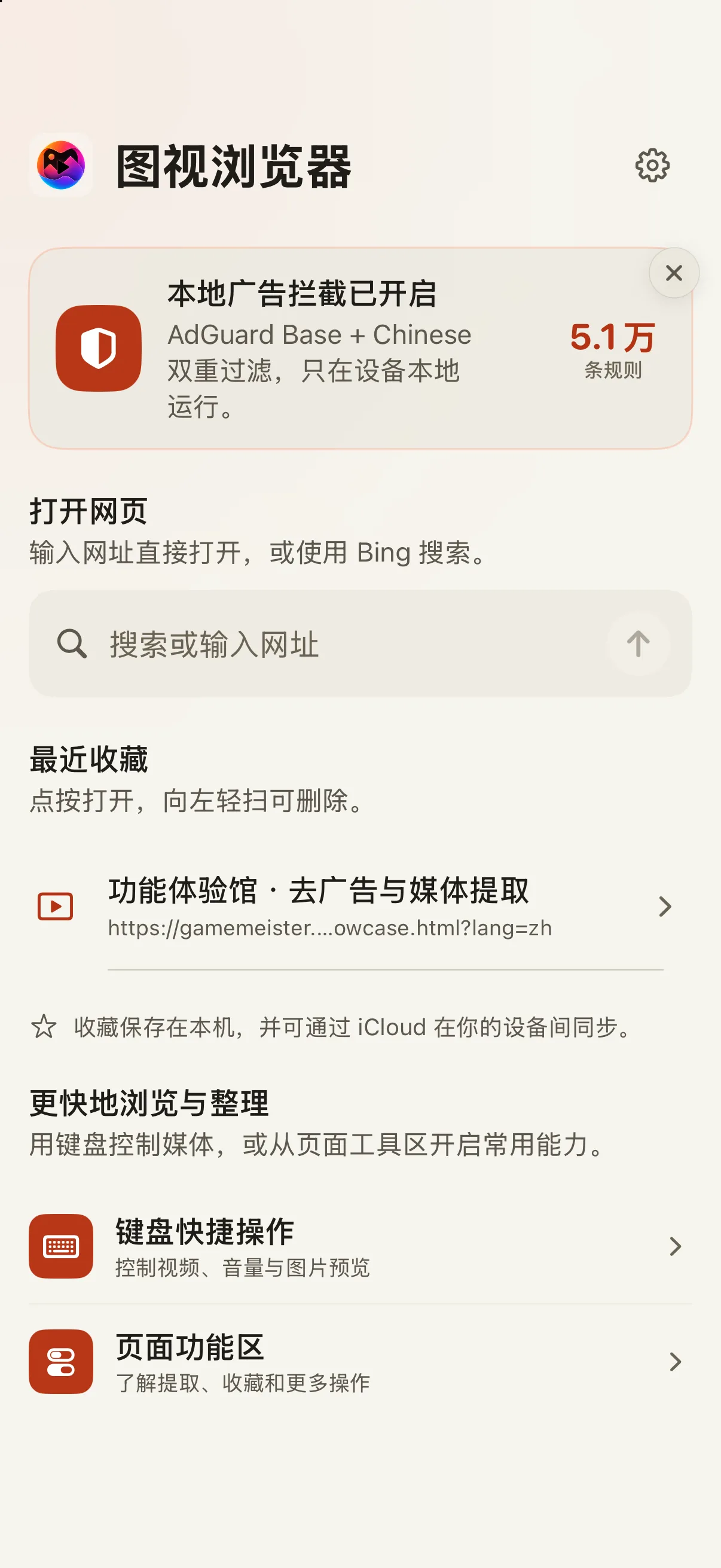
    查看 App 界面View the app screen
    当前 App 首页 · 模拟器截图Current app home · Simulator screenshot
  6. 修复返回异常,恢复音量提示Back navigation fixes and volume feedback

    • 修复在 YouTube 等网页连续切换视频后,返回停在加载页的问题。Fixed Back navigation getting stuck on the loading page after switching between videos on YouTube and similar webpages.
    • 修复部分网页拦截触摸时,侧滑返回失效的问题。Fixed swipe-back failing on some webpages that intercept touch gestures.
    • 使用设备实体音量键时,恢复显示系统音量提示。Restored system volume feedback when using the device volume buttons.
    • 更新内置广告拦截规则。Updated the built-in ad-blocking rules.
    查看功能示意View illustration
  7. 打开之前,先看清链接Know where a link will take you

    • 检测到复制的分享口令中有链接时,先确认再打开。Links detected in copied share text now require confirmation before opening.
    • 链接弹窗展示分享标题、网站图标和目标地址。Link prompts show the shared title, website icon, and destination.
    • 长内容可以滚动,打开和取消按钮始终可见。Scroll long prompts while Open and Cancel stay visible.
    查看功能示意View illustration
  8. 收藏与最近访问的文字排版Favorites and recent visits layout

    • 修复首页临时展开收藏与最近访问时,标题和网址可能重叠的问题。Fixed titles and URLs that could overlap when temporarily revealing favorites and recent visits on Home.
    • 改善隐私保护状态下首页个人内容的布局与可读性。Improved the layout and readability of personal content on Home while privacy protection is enabled.
    查看功能示意View illustration